Technology for common internet user


Friday, March 6, 2009

Effortlessly batch rename your files

Effortlessly batch rename your files (Photos / documents / or any type of files.

No software is required. Just follow these steps.

1. Open folder containing files that you want to rename.

2. Select the files. Control+A to select all or control+click to select files you want to rename.

3. Right-click on any of the selected files and click the Rename option)

4. Type the new name, example Myfile and then press ENTER.

All of the files in the series will be named in sequence Myfile. For example, if you type Myfile, the first will be named as Myfile, and subsequent files in the series will be named Myfile (1), Myfile (2), and so on. To specify the starting number for the series, type the starting number in parentheses after the new file name. The files in the series will be numbered in sequence starting with the number you type. For example, if you type Myfile(10), the other files will be named Myfile(11), Myfile(12), and so on.

Labels:

posted by Anand Kumar Reddy at | 0 Comments

Tuesday, August 26, 2008

Search query suggestions from Firefox

Search query suggestions from Firefox


Open Firefox and click the small triangle find at the search box and click manage search engines. You will find an option show search suggestion. Tick the check box and close. Here after when you start typing 4 or 5 letters you will get suggestion based on the letters you typed. This will help you to get the content precisely what you are looking for.


Labels:

posted by Anand Kumar Reddy at | 0 Comments

Sunday, August 3, 2008

Secure Your Gmail

Secure Your Gmail

Gmail uses both http & https protocols. If use http//gmail.google.com there is possibility of leak your data on its way to server. If you use https//gmail.google.com, your information is secured. There are two options to use this. One is by manually typing https every time you login other is by changing necessary settings in your gmail. Click settings on top right side of your gmail page -> General at bottom browser connection check always use https.

Labels:

posted by Anand Kumar Reddy at | 0 Comments

Friday, August 1, 2008

Benefits of exercise without exercise

Benefits of exercise without exercise

Mice that took the drug for four weeks burned more calories and had less fat than untreated mice. And when tested on a treadmill, they could run about 44 percent farther and 23 percent longer than untreated mice.

The no-exercise drug is in advanced human testing to see if it can prevent a complication of heart bypass surgery.

Full text article.
Cell, Volume 134 Issue 2: July 25, 2008
http://download.cell.com/pdfs/0092-8674/PIIS0092867408007691.pdf

Labels:

posted by Anand Kumar Reddy at | 0 Comments

Access Blocked Websites

Access Blocked Websites

Certain websites are blocked at work places / schools or in countries. To access such sites there are many ways. Most popular way is by using proxy. Another method is send email to send@webtomail.co.cc with the URL of the desired web-page as subject. Within minutes you will get that page into your inbox.

More details visit
http://www.webtomail.co.cc/

Labels:

posted by Anand Kumar Reddy at | 0 Comments

Saturday, July 26, 2008

Time saving firerfox shortcuts

Firefox shortcuts:

/ = Find As You Type Text
‘ = Find As You Type Link
Alt+F4 = Close Window
Backspace = Back
Ctrl+- = Shrink text
Ctrl++ = Zoon text
Ctrl+B = Bookmarks
Ctrl+C = Copy
Ctrl+D = Add bookmark
Ctrl+Enter = Add www at start and.com at end in address bar
Ctrl+F = Find in This Page
Ctrl+F4 = Close Tab
Ctrl+G = Find Again
Ctrl+I = Bookmarks
Ctrl+J = Downloads
Ctrl+Shift+W = Close Window
Ctrl+Shift-Enter = Add .org to address bar
Ctrl+Shift-I = DOM Inspector
Ctrl+W = Close Tab
Ctrl+X = Cut
Ctrl-Shift-G = Find Previous
Delete = Delete
F3 = Find Again
F7 = Caret Browsing
Shift+Delete = Delete Individual Form AutoComplete Entry
Shift+Enter = Add www at start and.net at end in address bar
Shift+F3 = Find Previous

Labels:

posted by Anand Kumar Reddy at | 0 Comments

Thursday, July 24, 2008

Convert from one unit to other online freely


Convert from one unit to other online freely

Most Popular
Currency Exchange Rates
Celsius to Fahrenheit
Fahrenheit to Celsius
Centimeters to Inches
Inches to Centimeters
Meters to Feet
Feet to Meters
Miles to Kilometers
Kilometers to Miles
Miles Per Hour to Kilometers per Hour
Kilometers per Hour to Miles Per Hour
Gallons to Liters
Liters to Gallons
Kilograms to Pounds
Pounds to Kilograms

http://www.calculateme.com/index.htm

Labels:

posted by Anand Kumar Reddy at | 0 Comments

Wednesday, July 23, 2008

Enabling right click on sites that disabled it

Enabling right click on sites that disabled it

Lots of web sites have disabled the right click function of the mouse button... it's really, really annoying. This is done so that you don't steal (via right-click->save picture) their photos or images or any other goodies. Unfortunately, it disables ALL right-click functionality: copy, paste, open in new window.

INTERNET EXPLORER

It's easy to change, assuming your using IE 6:
Click "Tools"->"Internet Options"
Click the "Security" tab
Click "Custom Level"
Scroll down to the "Scripting" section
Set "Active Scripting" to "disable"
Click "Ok" a couple of times.

You'll probably want to turn this back to "enable" when your done... 'cause generally the javascript enhances a website.


Mozilla Firefox

1. Go to Tools tools> Options and select Web Options from the left panel.
2. You would see that Enable Javascript is checked by default. Uncheck it and click OK.
3. Right Clicking should now be enabled on websites that do not allow it.
4. If this does not work, you could disable java altogether from the check box in the same window.

Opera

1. Go to ->Tools>Preferences and select the Advanced"Tab.
2. From the left panel, select "Content"
3. You would see that Enable Javascript is checked by default. Uncheck it and click OK.
4. Right Clicking should now be enabled on websites that do not allow it.
5. If this does not work, you could disable java altogether.

Labels:

posted by Anand Kumar Reddy at | 0 Comments

Monday, July 21, 2008

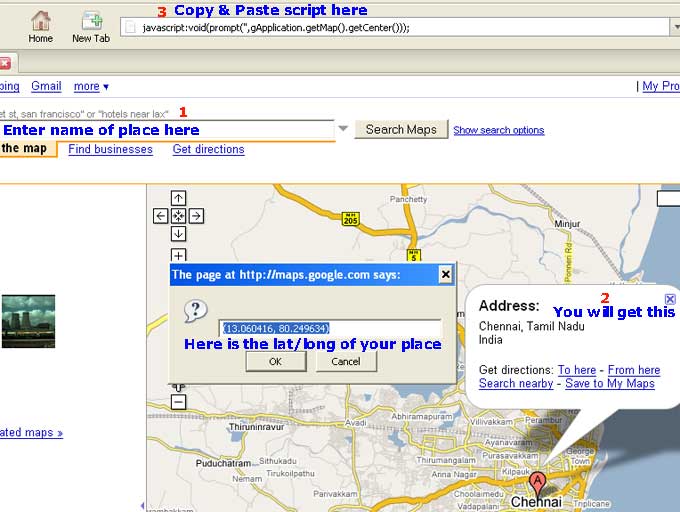
How to get latitude and longitude of your city using Google Maps

How to get latitude and longitude of your city using Google Maps


Here's a trick that allows you to get the latitude and longitude of a location from Google Maps. Just go to Google Maps and enter the name of place in search box. You place will be displayed in the map. Then copy and paste the following script in address box.

javascript:void(prompt('',gApplication.getMap().getCenter()));

hit enter.

You will get latitude and longitude for the place of your choice.


Labels: ,

posted by Anand Kumar Reddy at | 0 Comments

Sunday, July 20, 2008

Simple Solution to Enable right click on web pages

Simple Solution to Enable right click on web pages

On some webpages right click is disabled. To enable this function copy the following

javascript:void(document.oncontextmenu=null)

and paste it in the address bar and press enter key. No you are able to right click on that page.

Labels:

posted by Anand Kumar Reddy at | 0 Comments

Home remedy to kill Cockroaches

Home remedy to kill Cockroaches

Mix equal parts of sugar and baking powder. Sugar attracts Cockroaches and baking powder kills them.

Labels:

posted by Anand Kumar Reddy at | 0 Comments

Saturday, July 19, 2008

How to Add a Watermark in MS Word Documents

How to Add a Watermark in MS Word Documents (Office 2007)


You can add watermark in your MS word document it can be either text or picture or your company logo. Do the following to create your watermark.

Open a word document in Office 2007 and select the Page Layout tab in the Ribbon. Inside page layout, you will be able to see an option Watermark. Then you will see some text watermark samples. Either you can choose one from them and customise with your own text / font / color.


If you prefer to include picture or your logo click custom watermark and check Picture watermark then select Picture, Make sure that you have checked washout box click apply OK.

Because the picture is in washout mode text printed over it is clearly visible.

Labels: ,

posted by Anand Kumar Reddy at | 0 Comments

Friday, July 18, 2008

How to get Firefox search results in new tab

How to get Firefox search results in new tab


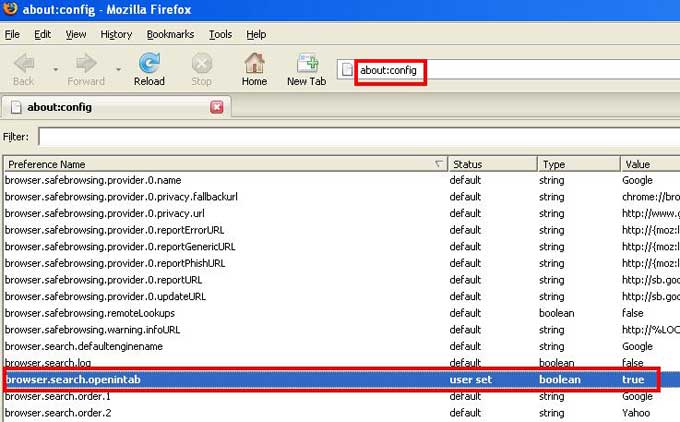
If you enter a search string in Firefox search box and press enter, by default results will appear in the current tab. If you wish to have them in a new tab do the following.

Type about:config in the address bar.
Scroll down to the entry labeled browser.search.openintab. By default its value is false. Double click it to make it true. Close firefox. Done. Here after your search results will appear in new tab

Labels: , ,

posted by Anand Kumar Reddy at | 0 Comments

Tuesday, July 15, 2008

Quickly Resize Desktop Icon Size in Windows Vista

Quickly Resize Desktop Icon Size in Windows Vista

Most of you are aware that you can zoom in or zoom out web pages in browser by holding control key down and scrolling the mouse wheel up or down. Same technique can be used to resize windows vista desktop icons according to your choice of size.

Labels: ,

posted by Anand Kumar Reddy at | 0 Comments


Privacy Policy