Technology for common internet user


Thursday, August 28, 2008

Use the power of your scroll mouse

Use the power of your scroll mouse

Most of us use scroll mouse wheel just to scroll the open page to scroll up or down. In fact there are lesser known features are available for scroll mouse users.

  • Hold down control key and scroll the wheel up / down to zoom in or out
  • Click the mouse wheel depending on the page you will get an icon with up and down or up, down, left and right arrows. Now move your mouse up , down left or right speedily (depending on the distance of mouse from the icon).
  • Click on any link with mouse wheel it will open in a new tab.
  • Click on any tab (not page) with wheel it will be closed

Labels:

posted by Anand Kumar Reddy at | 0 Comments

Monday, July 21, 2008

How to get latitude and longitude of your city using Google Maps

How to get latitude and longitude of your city using Google Maps


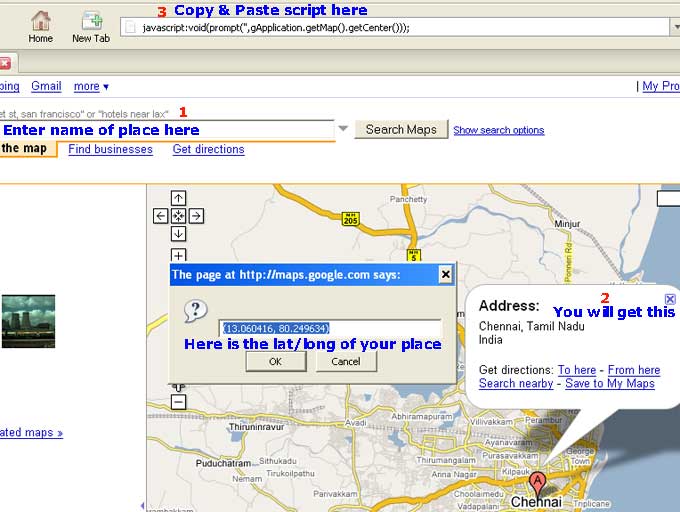
Here's a trick that allows you to get the latitude and longitude of a location from Google Maps. Just go to Google Maps and enter the name of place in search box. You place will be displayed in the map. Then copy and paste the following script in address box.

javascript:void(prompt('',gApplication.getMap().getCenter()));

hit enter.

You will get latitude and longitude for the place of your choice.


Labels: ,

posted by Anand Kumar Reddy at | 0 Comments

Sunday, July 20, 2008

How to build a UHF HDTV Antenna Cheaply& Effectively

How to build a UHF HDTV Antenna Cheaply& Effectively

If you are not getting good results with your purchased HDTV UHF antenna, or you haven't bought one yet, check out this site. They give step-by-step directions (it's only a couple of steps) on how to build your own HDTV UHF antenna for cheap. Not only is it cheap, but it seems to work better than the more expensive antennas

Read here
http://uhfhdtvantenna.blogspot.com/

Labels:

posted by Anand Kumar Reddy at | 0 Comments

Saturday, July 19, 2008

Download Powerpoint Templates

Download Powerpoint Templates (Office 2007)


By default few Design slides are bundeled with Powerpoint 2007. You can download more templates of your choice on various subjects. To do this click MS office logo on top left side corner. Click New below Microsoft Office Online you can find some categories. Choose the one from there or search in the search box in second column. A thumb nail preview will appear. Click it to download.

Labels:

posted by Anand Kumar Reddy at | 0 Comments

How to Add a Watermark in MS Word Documents

How to Add a Watermark in MS Word Documents (Office 2007)


You can add watermark in your MS word document it can be either text or picture or your company logo. Do the following to create your watermark.

Open a word document in Office 2007 and select the Page Layout tab in the Ribbon. Inside page layout, you will be able to see an option Watermark. Then you will see some text watermark samples. Either you can choose one from them and customise with your own text / font / color.


If you prefer to include picture or your logo click custom watermark and check Picture watermark then select Picture, Make sure that you have checked washout box click apply OK.

Because the picture is in washout mode text printed over it is clearly visible.

Labels: ,

posted by Anand Kumar Reddy at | 0 Comments

Friday, July 18, 2008

How to get Firefox search results in new tab

How to get Firefox search results in new tab


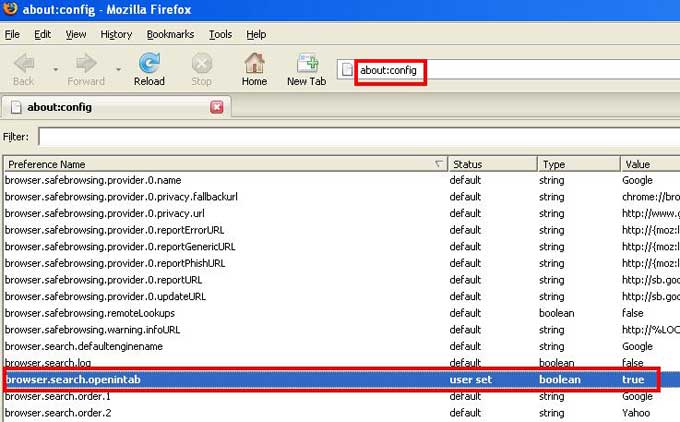
If you enter a search string in Firefox search box and press enter, by default results will appear in the current tab. If you wish to have them in a new tab do the following.

Type about:config in the address bar.
Scroll down to the entry labeled browser.search.openintab. By default its value is false. Double click it to make it true. Close firefox. Done. Here after your search results will appear in new tab

Labels: , ,

posted by Anand Kumar Reddy at | 0 Comments

Tuesday, July 15, 2008

Quickly Resize Desktop Icon Size in Windows Vista

Quickly Resize Desktop Icon Size in Windows Vista

Most of you are aware that you can zoom in or zoom out web pages in browser by holding control key down and scrolling the mouse wheel up or down. Same technique can be used to resize windows vista desktop icons according to your choice of size.

Labels: ,

posted by Anand Kumar Reddy at | 0 Comments

Sunday, July 13, 2008

Blue highlight on names of items in desktop

Blue highlight on names of items in desktop

To turn on or off blue highlight on names of desktop items do this -Right click on my computer => properties => advanced => click settings under performances => tick or un tick Use drop shadows for icon labels on the desktop.

Labels:

posted by Anand Kumar Reddy at | 0 Comments

Microsoft Word Text Selection

Microsoft Word Text Selection

Most of you might have known how to select text in MS word document.

To select a word double click on it
To select a sentence hold control button and click any where on the sentence
To select a paragraph triple click on a paragraph.

See this image if you wish to select text like this.


Place cursor at a point hold down alt button and drag mouse to right or left and bottom according to your need.

Labels:

posted by Anand Kumar Reddy at | 0 Comments


Privacy Policy